Scopin’ Out the Competition
Elyse
July 24th, 2015
I chose this image because a majority of my post is going to focus on becoming familiar with your competition and, well, what better represents competition than the Olympic rings? Fun fact: San Francisco is running to be considered for the 2024 Olympics.
Hey guys. If you’re looking for a recap of week 5 trainings, you’ve come to the right place. Without futher ado…
Get To Know the Other Guys
My Digital Marketer (EP) choice for week 5 was Market Research Blueprint . This EP aligned well with the Project SaaScend project I’ve been working on for the very reason that researching our market / landscape is most crucial in the beginning stages. I really liked this EP because it was more interactive than prior ones I’ve done – there was a worksheet provided to fill out your competitors while concurrently finishing the EP.
Identify Your Biggest Competitors
Using Google for Organic & Paid Competitors
In this section of the EP, Roland Frasier (author) walks you through the process of identifying your top 10 competitors – both organic and paid. He simply uses the Google search engine to type in the keywords of his desire topic (in his case: “memory improvement”). From there it’s pretty self-explanatory. He just finds the top results, and enters them into the worksheet. Word of advice, use discretion when going through this same process with your company. Don’t just blindly copy any result that shows up – make sure it’s a legitimate source.
In-Depth Keywords & Competitor Research Using SEMRush
In this next section, Fraiser introduced a paid tool he likes to use when researching competitors called SEMrush . SEMrush specializes in keyword research, track positions, identify links and other SEO goodness. The way to really utilize this tool is to first do an organic search to identify your #1 competitor, and then plug it into SEMrush. This website is super legit – it will literally list up to like 10,000 competitors. So depending on the size of your company / project, this website could be super valuable.
Identify Your Ideal Buyer and Improve Ad Targeting
Using TowerData to Profile Your Buyer’s List
This section explains what to do if you already have a huge list a buyers, and you want to segment them accordingly. TowerData runs analysis to determine your buyer’s demographic and psychologic profiles to help you easily target them through various social media channels. It’s pretty cool how Frasier shares all this amazing information and all the tools he uses with you for free (sort of).
Using Quantcast and Alexa to Profile Visitors
Quantcast is the perfect tool to better understand your customer / audience. It’s borderline creepy how detailed the results are. You can find out the age range, salary, political affiliation, and much more with Quantcast. Just the everyday life of a marketer. Alexa is another competitive intelligence tool that Frasier discusses and that I (very happily) am familiar with! Alexa was introduced to me about 2 weeks ago when I was doing the Udemy course. Kinda cool how everything in these trainings come full circle. I digress. So anyways, Alexa is just alternative tool to use in case Quantcast did not provide you with all the information you were looking for. Or if you just wanted to use a different one. It’s always good to have options, right?
Using SimilarWeb to Find Out Where Your Audience is Visiting
If you want to better understand/monitor website traffic, then SimilarWeb is the tool for you. SimilarWeb provides user engagement statistics for both websites and mobile apps.
I don’t know about you – but I’m experiencing information overload (in a good way). So I won’t go into detail about the remainder of this EP because it gets very nitty gritty. But from what I have covered above, you should have a general sense of what this EP is about. If it interests you, definitely check it out!
Twitta Cards
The next part of trainings was to read about Twitter Card Documentation. . I actually did an EP regarding this very same topic during Week 3 , and if you want to read my explanation of Twitter cards, please refer to that post. But in this post I will recap Card Analytics, which is something I didn’t cover.Twitter Card Analytics is awesome because it gives you insight on the good, the bad, and the ugly. Analytics provides key metrics (i.e. clicks, app installs, retweets, etc.) for you to use however you see fit for your Twitta game. Here are some examples of the awesome features provided to you by our friends over at Twitter:
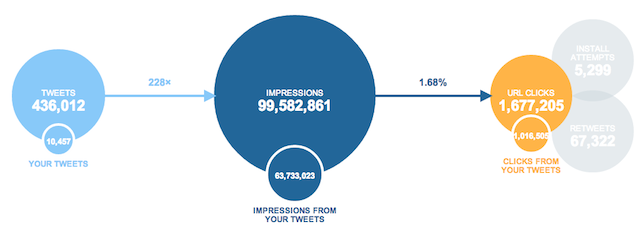
Your Snapshot
Provides a holistic view of how your content is performing on Twitter, showing the number of Tweets containing a link to your website or app.
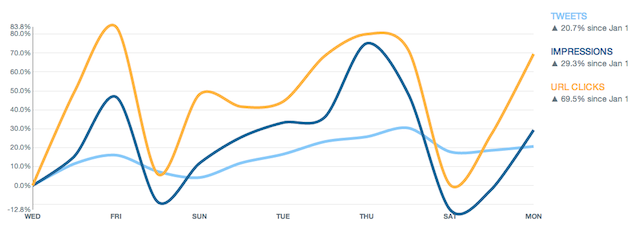
Change Over Time
Provides a look at how the overall data in Your Snapshot has changed over time.
I don’t want to bore you, so I won’t go over all of them. But again, this is just to give you a recap of what was learned, so if you feel inclined to check it out, absolutely do so!
Cah-pywriting Course Research
In case you’re wondering why I spelled “Copywriting” in that strange way, that is how the folks from places like Michigan (* cough Burke * ) pronounce it. Just though I would add some flair.
The last part of training was to research a bunch of good copywriting course. All of which live in our very private team Google drive folder – so I cannot give out access on this very public place of the interwebs. But trust me when I tell you that there are some awesome courses in there.
Welp, hope you enjoyed reading about week 5 of trainings! Huge shoutout to my fans for staying loyal and checking in every week. Mix tape dropping soon. Farewell, friends.

{e}

-
Andrea