
Create Cliffhangers for More Engaging Email
Alex
July 12th, 2015
Editor’s Note: Sorry I’m late publishing this! I had it done, just forgot to hit the good ole PUB button.
Another week, another blog post in the books. Here’s what happened to me during Week 3 of Red Bridge Training.
Complete 1 Digital Marketer Execution Plan of Your Own Choosing
- Create content for a healthy email list. This is simple but so true. By creating content and pushing your content through email you keep your email list healthy and active! It’s genius!
- Content Sells (No wall between promo and content) You own the content and the offer; blend them together! There shouldn’t be a difference or exists in a silo. Map content back to something!
- Content is key to retargeting. This is my favorite takeaway from this EP. Retargeting people based on the content they viewed. First of all, its smart to do that in general. Second of all, you can do this as a way to retarget people dynamically depending on what they viewed! Such a smart way to retarget and use ads that are actually RELEVANT!
Code – Complete LearnLayout (CSS)
Write Down any concepts that are difficult for you
Moz and Webkit? I didn’t understand what they were talking about when they were covering this.
Explain the difference between Relative & Absolute positioning
Static is the default value. An element with position: static; is not positioned in any special way. A static element is said to be not positioned and an element with its position set to anything else is said to be positioned.
Relative behaves the same as static unless you add some extra properties. Setting the top, right, bottom, and left properties of a relatively-positioned element will cause it to be adjusted away from its normal position.
Absolute behaves like fixed except relative to the nearest positioned ancestor instead of relative to the viewport. If an absolutely-positioned element has no positioned ancestors, it uses the document body, and still moves along with page scrolling.
What is the Box model?
The CSS box model is essentially a box that wraps around HTML elements, and it consists of: margins, borders, padding, and the actual content.
The box model allows us to add a border around elements, and to define space between elements.
Write out the following code – “A H1 with a margin of 20px in a 100×100 red box”
* {

margin: 20px;

border: solid red;

bottom: 100px;

top: 100px;

left: 100px;

right: 100px;

}
The Box Model
Read – 1 to 2 Quicksprout Blog Posts
The 5 Stages of Blog Growth: How Your Traffic Tactics Should Change as You Grow
Stay tuned here. I read this blog post last week and have a whole thing about it.
How to Write Emails Your Subscribers Can’t Wait to Open
Couple of things here:
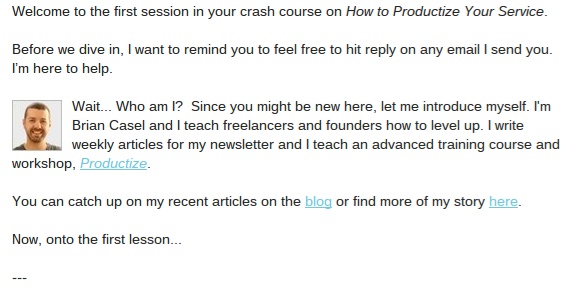
- introduces himself so you won’t forget him
- includes a headshot
- introduces his product without being overly pushy
- establishes expectations by saying this is the first in a series of email lessons
At the bottom of every email, he includes the following blurb under the “PS”:

I LOVE this. Such a great idea. Especially when you get an email that isn’t immediate. I know that sometimes I get an email for something I signed up for and have to remember what I signed up for. Awesome idea.
Next idea I want to incorporate is the idea of cliffhangers, like so:
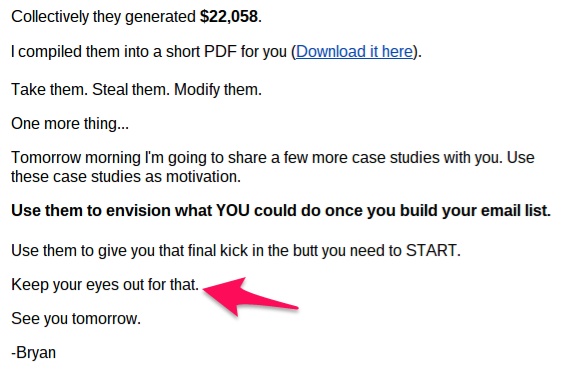
Last thing I liked was the idea that email shouldn’t be one-sided. Ask your audience what they think.


Burk
Alex is probably thinking about food right now.